Showing posts with label writing. Show all posts

Friday, August 16, 2013

New Classroom Resources + Freebies!

While on a trip recently, I doodled this idea for a poster activity:
The purpose is to help kids focus on descriptive sensory language in what they are reading. When they find an example of a sight, sound, taste, smell, or touch-related detail, they will record it in the corresponding area of their poster.

The poster can be used with any text of reasonable length such as a magazine article as well as fiction or informational books. Here is a sample of the poster already filled in:
As they read, students will record words or phrases that relate to the 5 senses— rough fence; everyone stares; flavor of grass; sniffs the air; listens for the cow bell— or write a short summary as shown above to give more context.

There's also a vertical version included which you can see in the lower right of the cover:
Click to see 5 Senses Read & Write in my TpT shop.

Another new item is this Owl Combo Pack of Whooo's In Our Class? get-to-know-you foldable plus Owls Are All Write! Graphic Organizers and Writing Papers.
Though this is discounted already, it will be included in the sale. The same goes for the Similes Classroom Books Combo Pack:
Similes & Meanings has 30 familiar similes for kids to illustrate, while Simile Starters has 30 prompts for students to write new, original similes.

We're Nuts About Goals! is a fun craftivity for kiddos to learn about setting goals as early as Kindergarten. They don't even have to be able to write, they can just draw pictures on the acorns. Learning how to set and achieve goals can make all the difference in life so it's an important concept for all students.
Age-appropriate goals could include:
Learning a specific new skill
Meeting a particular Common Core State Standard
Following a class rule
Improving a certain behavior
Trying new things
Reading X number of books
Practicing something a certain length of time per/day or week

As always, my classroom resources including the graphics are original creations by me. Speaking of graphics, this Apple Frames FREEBIE has gotten a ton of downloads and great feedback already:
To make it easier for teachers to find my freebies, there is now a Freebie Category in my shop. To find the newest resources, click on the Most Recent link on the main store page or the NEW! category.

These are most of the "newbie" resources in my shop. I love making classroom resources so more are on the way!

Loreen
My web site

Sunday, June 2, 2013

Whooo Likes Owls? From Doodle to Designs

Recently I was doodling some ideas for fall writing templates. (Yes, I know the school year is barely over and summer beckons!) This little owl popped up on the page.
There was something intriguing about him. Eventually, it occurred to me that with the out-stretched wings he could make an interesting 3-section graphic organizer. And as an option, the wings could fold in to hide the contents!
Naturally I went bonkers and made a bunch of them. There's a a KWL chart; Sequencing 1-2-3; Beginning-Middle-End; Are-Have-Can; and a Blank Template. They have primary lines, plain lines, or no lines, for 18 designs in all. They can be used for a wide variety of creative projects such as fall and winter writing, fiction and nonfiction about owls, forest animals, predators, food chains, and so on. Here is the cover of Owls Are All Write!:
Click image to visit my TPT store
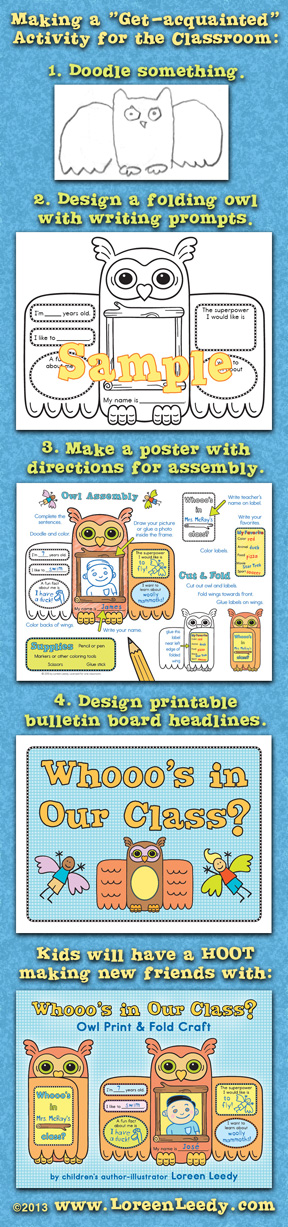
After that was finished, I took my almost-90-year-old mother to visit family and old friends in the northeast. While we were on the road, another idea popped up, this time for a "getting to know you" activity. The long image below gives an idea of what Whooo's in Our Class? is all about:
Kids finish the writing prompts, doodle and color, draw or paste in a photo of themselves, and cut out and fold their owl's wings. Students can browse the finished owls to find out fun facts about each other. It will be great for a back-to-school activity or any occasion when kids are getting to know each other. It's a quick print and go kind of thing, which can certainly help in the hectic beginning days of school. This is my newest classroom resource, and will be discounted for a few days. I mark down all new products as a "thank you" to the wonderful teachers who follow me.

But for now, grab a book, relax in a hammock for awhile, and have a great summer! If your school year isn't over yet, hang in there!

Tuesday, April 9, 2013

Make a Class Book of Similes!

Similes are a type of figurative language, a subset of metaphors to be precise. In other words, all similes are metaphors, but not all metaphors are similes. Many familiar similes have been overused to the point they are considered clichés. We've all heard and/or said, "...as hungry as a bear," for example. But if you're a kid you don't know many familiar sayings. It's kind of a cliché Catch-22...you have to learn them to avoid using them! To help with this conundrum, I've already created a picture book written entirely with similes, plus a free follow-up book extension with real photographs of the items used in the comparisons (see this post for more info).

I just finished a set of 30 printable pages to help children learn similes by drawing pictures of them. First they draw a silly, literal picture, then a picture of the actual meaning. (Or at least, one meaning...many sayings have more than one meaning.) This image shows the steps leading up to a class book.
Click on image to visit my TPT shop.
As the last step shows, kids can use the Blank Template to write and illustrate new, original similes to add to the class book. Or the pages could be used in a bulletin board display of Familiar vs. Original Similes, as one idea. To download the Preview and try a sample page, please visit my shop on TeachersPayTeachers. Also included in the packet is the class book cover in color and black & white.

One group that has trouble with similes and other expressions are students learning English as a second language (ESL, ELL.) I can't imagine trying to make heads or tails of all the idioms we use at the drop of a hat. See what I mean? This activity was a lot of fun to create, and I hope people find it useful. Thanks for reading!

Saturday, March 30, 2013

Learning about Monarch Butterflies by Reading, Writing, and Crafting

I've been intrigued by the possibilities of presenting educational topics in alternate formats other than in books. Not that I have anything against books, obviously! It's just that the digital age we're in opens up the door to so many additional possibilities. My latest classroom resource focuses on one of our most beloved insects, the Monarch butterfly. Several printables are included, such as these in progress below.  Thanks go to my niece Anna for doing the coloring!

Shown is the pre-printed version for lower level students...the alternate version has blank areas for students to write in the facts on the wings as well as the labels on the diagram. There also is a version with the terms Caterpillar/Chrysalis rather than Larva/Pupa. Here is the finished Monarch, with a 3D Life Cycle "dangle" (if that's the right term!)
The back has the Body Parts diagram.
I wanted students to have realistic art to work with so they could create something beautiful to showcase what they have learned. There are several other activities that go along with the craft including an informational text selection, a Life Cycle poster with photographs of the four stages, fact vs. fiction cards, and more. If you'd like, please check out the Preview here.

Hope you're having a wonderful Spring!

Sunday, March 17, 2013

Crazy about Similes: A Book Activity

Many of you are familiar with my picture book Crazy Like a Fox: A Simile Story. If you haven't read it yet, this video trailer gives the gist of it:
The book's premise is to illustrate the comparison used in the simile. So, because Rufus the fox is sleeping like a log…
 …he is transformed into a log on the next page. The entire story is told in similes, with additional similes added by side characters. The idiomatic title of the book is explained by the plot itself: Rufus acts “crazy” to provoke the sheep Babette into chasing him with the secret purpose of luring her to her own surprise party. Most readers agree that it's an engaging way to introduce these figures of speech to students.

Recently I made a free PowerPoint slideshow as an extension activity for this book. It reviews the similes that tell the story and uses real photographs to help kids understand  the comparison. Each slide also asks a question that refers to the book.
You can download it from my shop on TeachersPayTeachers.

Hope it's as much fun as a barrel of monkeys!

Sunday, February 17, 2013

St. Patrick's Day Freebie: A Comic Strip Template

My Comic Strip Templates for K–12 Writing have been popular so I was inspired to add a couple more. This one is for St. Patrick's Day, shown here with tips about using it:
Click image to go to Preview download page
To get a free sample of the 4-leaf clover template, go to this page in my TeachersPayTeachers shop and download the Preview. 

If you print it on green paper, it will look like this:

If you already have the Comic Strip Templates PDF, be sure to download the file again to get the new templates. 

For a linky party of March-themed teaching resources, please visit The Balanced Classroom.

Wednesday, February 6, 2013

Comic Strip Templates and a Freebie for Valentine's Day!

I just finished a set of comic strip templates for students from K-12 to use for writing and art projects. There are so many ways to use them...to summarize, for cause and effect, main idea and key details, using vocabulary words, writing a narrative or informative text, and much more. There are 28 templates plus a page of dialog/thought balloons and a page of comic style words and art elements. Here are half of the pages (you can see the rest of the templates in the Preview):
Look for the template you need on the "page finders" as shown above. The numbers in the yellow circles show which page of the PDF it's on. It's basically a visual index, which should make finding the right one easier. 

The heart freebie is located in the Preview (download it in my TPT store here) and looks like this (minus the usage tips shown here):
The heart template could be used to tell the story of how a student's parents met, a fanciful history of Valentine's Day, tips about how to be a good friend, a love letter in comic form to someone special, or anything else your students can dream up.  

Enjoy!

Loreen

Friday, February 1, 2013

Valentine Mystery Critters: a digital picture book

As a picture book author-illustrator, I've been intrigued by the advancements in digital books, especially features that aren't possible in printed books. After looking into book apps and other technically arduous and expensive ways to add motion, effects such as appear/disappear, and other fun elements to my picture book making toolbox, I recently found a much simpler way. The video shows how adding simple animations can allow a book to exist that would be impossible otherwise. And I made it myself without a lot of unnecessary fuss.

As the video mentions, Valentine Mystery Critters was made in PowerPoint, of all things. I used the built-in vector shapes to keep the file size small and also just to see what could be done with simple circles, triangles, rectangles, and of course, hearts. Optional speaker notes are included in case a teacher or parent wants to extend the book beyond reading and watching it. For example, you can discuss the different kinds of shapes, their colors, their orientation, and so on before proceeding to watch the shapes assemble themselves into a critter.

Naturally this format has advantages and disadvantages, so here goes:

Pros
  • PowerPoint is installed on zillions of computers.
  • The book can be read on Mac or Windows computers with or without a projection system.
  • It can be viewed on iPad with the free app SlideShark...it's easy to use and even has a built in laser pointer, which is always fun.
  • While it was tedious work to get the animations working right, it was relatively easy and straightforward to make the book in PowerPoint compared to hiring a developer and trying to enter the labyrinth that is the Apple iTunes/App story, for example.
  • You can include printable activity pages.

Cons
  • PowerPoints have limited interactivity compared to book apps and the various formats for interactive whiteboards.
  • PowerPoints don't have digital rights management like iPad apps do, so somebody could steal my work and post it online. What can I say except let's hope the pirates have bigger fish to fry than to steal my digital children's books...! Also, people who use pirated versions don't have access to updates.
  • The book won't function properly on old versions of PPT. Someone has tested it for me and it works fine on the Windows 2007 version. Of course, most digital products run into this issue.

There probably are other "cons" but I can't think of more at the moment.

Here's the cover and the link to the book on my TeachersPayTeachers store.

No doubt I've only scratched the surface of what can be done in PowerPoint...the program has been around for a long time, but it's new to me. One thing that is on my list is to make a non-linear something or other, because you can have multiple links on a slide that take you to different slides.

Update: I've also made a version for Mac Keynote. (It won't work on the iPad, but the PowerPoint book will with the SlideShark app. Ironic, I know!)

Have a great Valentine's Day!

Wednesday, January 30, 2013

The Valentine Train Roll-a-Story Freebie

What is the Valentine Train? Where is it going? Who is waiting for a Valentine? What if one gets lost? These questions and more can be asked and answered by students... all they need to do is roll the dice, then add their ideas to create their own original stories. (A black and white version of the story element grid is included in the PDF.)
Each kiddo rolls the die once per column for a total of three rolls. They enter their results on this page:
After this pre-writing activity, the kids will be ready to "roll" and finish up their stories.
You can download the PDF here. 


Happy writing, and have a great Valentine's Day!

Wednesday, June 13, 2012

Let's Write: Pencil and Paper Characters

I just finished another clip art set for teachers, authors, scrapbookers…whoever! This group can be used on worksheets, mini-books, posters, writing workshop materials, cards, and anything else that needs a whimsical writing theme. There's a FREE sample in the Preview to try out on my Teachers Pay Teachers store.

Can't wait to see what everyone comes up with. The pencil character in this clip art group is similar to one from Look at My Book: How Kids Can Write and Illustrate Terrific Books. There is a link to a free writing process poster on that page of my web site, by the way.

As you can see from the picture, each image comes in color, grayscale, and black line art, depending on the end usage. For example, nobody wants to print color images on a zillion worksheets, but probably would for a poster. The line art ones are good for coloring pages.


I want to make related set of borders…maybe with scribbly doodles all around.

Thursday, October 13, 2011

Tracks in the Sand now on the #iBookstore!

After being stuck in my flat files for too long, my sea turtle picture book is back in the swim of things again.

Here is the iBooks preview page …if you’re using an iPad to read this blog post you can download a free sample right away.

Or, later on you can open your iBooks app, click on the Store button and search on Tracks in the Sand. Eventually I’d like to make this book available on other tablets/formats, but this is a start.

Also, this page on my web site has a coloring page to download.


So now the question is, what will my next digital project be…?

Toodleloo for now!

Loreen

Wednesday, March 30, 2011

Can books play games?

I’ve been enjoying reading a book about video, computer, and alternate reality gaming called Reality is Broken: Why Games Make Us Better and How They Can Change the World by Jane McGonigal. I saw her by chance on a segment of a show that plays with the notion of what is news, The Colbert Report (you have to watch a silly ad first, sorry):

The Colbert ReportMon - Thurs 11:30pm / 10:30c
Jane McGonigal
www.colbertnation.com
Colbert Report Full EpisodesPolitical Humor & Satire BlogVideo Archive

There are many concepts she discusses that could be incorporated directly into a book or story app or be a part of the extended world around one (e.g. via an author’s web site). My monthly post on I.N.K. (Interesting Nonfiction for Kids) goes into more detail about it: Playing games with information.


A few of the interactive, gamelike ideas that would be fun to add to my books include: 
Layered images so readers could see under the surface of something
Changing images to show sequence over time (e.g. metamorphosis)
Non-linear paths through a book
Interactive timeline with pop-up elements

Pop-up word definitions
Audio feedback to let readers know they’ve found right answer, etc.


I would love to hear how authors or educators are tapping into the techniques of game design to engage readers, please let me know of any cool ideas.


Tuesday, February 22, 2011

A flip-book preview of My Teacher is a Dinosaur

Originally I created this to go on my web site, on this page. A little flip-book is a really great way to let people browse inside your book, and you can choose which pages to include. Click on the right corner below to see it in action. [Update: if you’re reading this in Google Reader or similar RSS reader and don’t see a little book with flippable pages, please click on the post title and visit the blog to see how the flip-book works.)

So, how did I do this, you’re wondering? The book is laid out in InDesign CS4 and here are the steps:
To add the page curl to all pages, in the menu bar choose Window> Interactive> Page Transitions, and a little palette will open up.
From the drop down menu, choose Page Turn.
Click on the little symbol on the lower right to apply the effect to all pages.
In CS4 you can’t preview it (might be different in CS5.)

Now it’s time to export it. Choose File> Export, type in a name for the flip-book, select the SWF format and a destination for the Flash file and hit Save. Next the Export dialog box comes up:
I chose a 50% scale to reduce the size of the book, but other sizes will work so experiment. I wanted only a few pages, not the whole book, so Range is checked with the page numbers filled in. These were also checked: Spreads; Rasterize Pages; Generate HTML File; View SWF after Exporting (I’m not sure whether these all need be checked, really.) Be sure to check Include Page Transistions and Interactive Page Curl, obviously! The JPEG quality seems okay at Medium. If View SWF is checked, at least on my system it automatically opened in my web browser, Firefox. There you can play with the page turns and make sure the flip-book is working right.

One little wrinkle is that this book has some white pages, and on top of a white web page, it’s impossible to tell where the page corner is (to activate the page flip.) So, before exporting it from InDesign, I added a light gray rectangular border to the pages 12-19 (visible in screenshot) so the corner would be visible against white. You may wonder why I didn’t export starting with page 12? If you do that, it exports the entire previous 2 pages, also.

If you don’t typeset your own books (not many illustrators, do) it should be easy for the publisher to provide a SWF file, assuming they use InDesign.

Then, how to get it on a web page? Naturally, that varies with the software used. In Dreamweaver, the SWF file is copied into the root file of the site. Then on the web page, draw an AP DIV box, and under file menu choose Insert> Media> SWF. Then, because the page flip extends outside of the dimensions of the book, I added about 60 pixels to the height of the bounding box. The flip-book will still work if you don’t do that, the animated pages will just be a little cut off.


How did I get it onto this blog? Blogger won’t accept Flash directly, so the file has to be somewhere else (in my case, it’s on my web site.) In Blogger, I pasted this HTML code into the Edit HTML tab:
<embed height="420" pluginspage=" http://www.macromedia.com/go/getflashplayer" src="http://www.loreenleedy.com/Dino.swf" type="application/x-shockwave-flash" width="576"></embed>

You would have to replace my web URL and SWF file name with your own. Your Height and Width values probably will be different, too. This flip-book might be a little too big for my Blogger layout, but it’s perfect for my web site, so I left it as is. Hope the page turns work here on the blog, I’ll find out after this post is published!


Tuesday, October 26, 2010

Blogs about science books for children

It was a pleasant surprise to find this review of The Shocking Truth about Energy on the blog Simply Science: Using books for easy science lessons. I certainly can’t argue with this quote:

“The publisher says the book is for younger audiences, but I loved it and can see it read by older kids, too. It is succinct and complete, and a wonderful resource. I’d love to see it in every library in this energy-conscious age.”

It is funny how publishers put an age range on books that isn’t necessarily that accurate. It may have something to do with how they organize their catalog or some other arcane reason. Guess I should ask one of these days.

Here is an activity page for this book. Enjoy!


Related Posts Plugin for WordPress, Blogger...
Pin It button on image hover